professional-work
University thesis review platform — shared UI and a foundation for collaboration
I handled the thesis review admin frontend and built shared UI and API integration. On the student and professor platform, I worked with one other developer using that foundation, refining assignment feedback, overlapping schedules and PDF rendering.
Turning review procedures into screens
The university thesis review platform lets students and professors apply for reviews and check schedules, results and submitted documents. I handled the admin frontend and worked with one other developer on the student and professor platform.
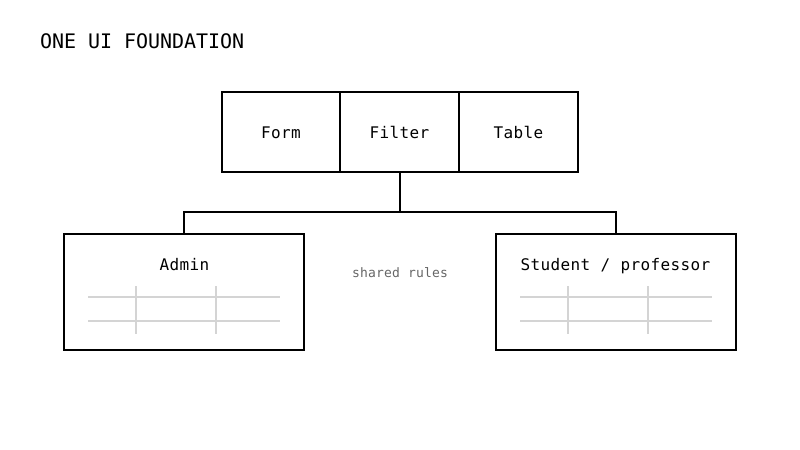
Many admin screens repeated similar filters, tables and forms, but their behavior could not be identical. Review states affected what to show, and editing a schedule needed to remain distinct from confirming its assignment.
I built shared forms, filters, tables and pagination, connected OpenAPI-generated types and clients, and used them in student, professor, review and schedule-management screens. After an assignment was applied, I updated check states and feedback immediately so the user could see the result of the action.
A foundation another developer could use
The student and professor platform had no separate screen designs. I referenced the university’s design guidelines and reused key components from the admin to establish its UI foundation. I also supported the new developer’s onboarding onto that foundation.
I then refined scheduling on top of it. Monthly and weekly views used shared state, and chained overlaps were grouped together. Reading events in start-time order while tracking the latest end time allowed schedules overlapping an earlier member of the group to stay together.
Reusing the admin components made me reconsider whom shared UI serves. It gave another developer and me a common basis for extending the platform, and, in my experience, helped with onboarding.
Document rendering beyond shared code
Execution environments still differed. In the admin, I introduced react-pdf and self-hosted the required PDF.js assets to address broken CJK characters. On iOS in the user platform, I applied page virtualization so the viewer rendered only the needed range of pages.
Keeping completed actions visible
Shared UI also needed consistent data rules. I validated admin URL filters and pagination with schemas and mapped API enums and optional fields to screen values. For schedule assignment, I disabled already-assigned options and updated related caches and check states after applying changes. Shared tables still had to respect each task’s query conditions and available actions.
Chat lists, messages and unread counts followed different update paths. I organized TanStack Query cache keys and update scopes, connecting WebSocket events, polling and debounced invalidation. On the user platform, I brought chat and notifications into a shared floating window and refined read marking and notification navigation. Mobile PASS authentication included callbacks and app-return fallbacks to handle the steps after external authentication.
The agricultural e-commerce project also involved repeated lists and domain policies. Comparing the experiences now, I judge shared code by whether different tasks and developers can use consistent rules. This is a present-day reflection. Within the university project, reusing admin components in the user platform was an actual connection between the two projects.
I handled the admin frontend broadly, working with existing code and changes by others.